
Contributor GuidesComplete and track work
Follow Submissions
Find submitted work in Contributions and understand Review, Pipeline, and Earnings status.
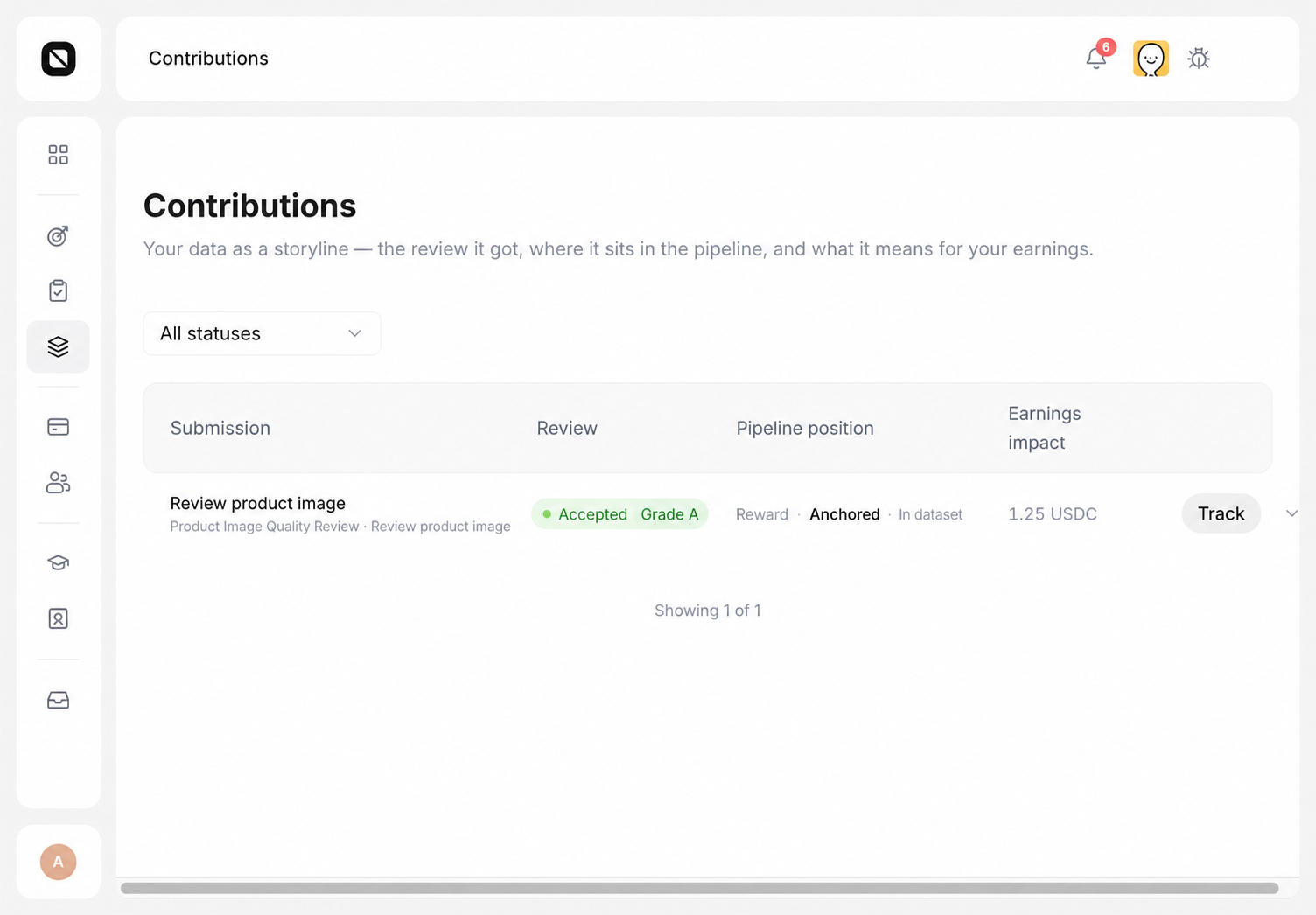
Each successfully submitted Task creates a Submission. Contributions is the primary place to follow review results and available next actions.
Find a Submission
- Open Work → Contributions.
- Use status or the other available filters to find the record.
- Review its Review result, Pipeline position, and Earnings impact.
- Use Track, Appeal, or Resubmit only when that action appears on the row.
Understand review results
| Result | Meaning | Next step |
|---|---|---|
| Under review | Review is not complete. This is not a rejection. | Continue following the Submission in Contributions. |
| Accepted | The Submission passed the applicable acceptance steps. | Follow downstream processing and Earnings. |
| Rejected | The Submission did not pass the applicable review. | Use Appeal or Resubmit when shown. |
| Integrity review pending | Integrity review is still in progress, so the result and related value are temporarily held. | Add context through Appeal when shown, or wait for an update. |
Submission status and Campaign status are independent.
Completion check
You can locate the Submission and identify its review result, Pipeline position, Earnings impact, and available next action from the current row.